Guide

Lost your TV remote?
Your phone is the fix.

Before you order a replacement, try this: Zap turns your iPhone into a full TV remote for Google TV, Android TV and smart TVs — free, in seconds.

Download on theApp StoreFree · no account
Zap

How it works

Lost your TV remote? Your phone replaces it

No new remote to buy

Skip the replacement order. Install Zap and control your TV from your phone right now.

Full set of buttons

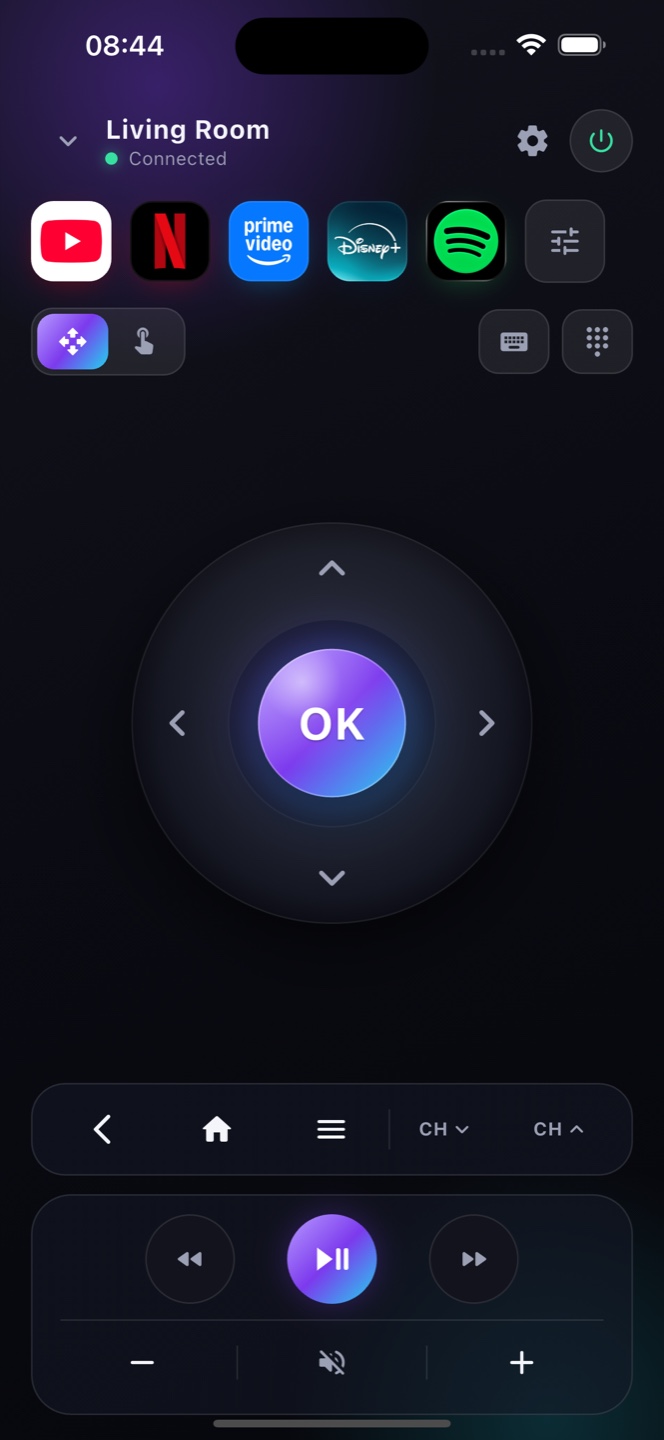
D-pad, OK, back, home, volume, power, playback and a keyboard — everything the lost remote had.

Works over Wi-Fi

No pairing dongle and no line of sight — Zap reaches your TV over your home network.

Ready?

Turn your phone into the remote.

Free on the App Store. Point, tap, done.

Download on theApp Store

The one catch: turning a fully‑off TV back on

A phone remote talks to your TV over Wi‑Fi, so the TV has to be awake and on the network to hear it. While the TV is on or in standby, Zap does everything a plastic remote does. The tricky moment is a TV that’s been fully powered down — with no remote to press the power button, it can’t wake over the network unless a low‑power standby mode is left on. On most Google TV and Android TV sets that setting is called “Network standby,” “Quick Start” or “Power on with mobile,” usually under Settings ▸ Power or Energy. Turn it on now, while you can still reach the menu with Zap, and a lost remote never leaves you stuck again: your phone can then wake the TV and power it on over Wi‑Fi.

Control your TV without a remote

Turn the TV on
If the TV is fully off, press the power button on the TV itself — or enable Network Standby / Wake‑on‑LAN in its settings so Zap can wake it over Wi‑Fi. Once it's on, your phone takes over.
Connect over Wi‑Fi
Open Zap on your iPhone on the same Wi‑Fi as the TV. It finds your set and pairs in seconds — no remote required.
Every button, on your phone
D‑pad, volume, home, playback, keyboard and voice search — a complete replacement for the plastic remote you lost.

FAQ

Questions, answered

I lost my TV remote — what can I do?
Install Zap on your iPhone, join the same Wi-Fi as your TV, and your phone becomes a full replacement remote in seconds.
Which TVs does it work with?
Google TV, Android TV and most smart TVs and streaming players on your network — Sony, TCL, Hisense, Chromecast, NVIDIA Shield and more.
Is it cheaper than a new remote?
Zap is free to download, so it's the fastest and cheapest way to replace a lost TV remote.
How do I turn on my TV without the remote?
Press the physical power button on the TV, or enable Network Standby / Wake‑on‑LAN in its settings so Zap can turn it on over Wi‑Fi. After that, control everything from your phone.
My remote is broken, not lost — does that matter?
No. Lost or broken, Zap replaces it entirely as long as the TV is on and on your Wi‑Fi.
Do I need to buy a new remote?
Usually not. For most Google TV, Android TV and smart TVs, Zap is a free, full replacement — no shopping, no batteries.
Can I turn my TV on with my phone after losing the remote?
Yes, if the TV’s network standby is enabled — look for “Network standby,” “Quick Start” or “Power on with mobile” under Settings ▸ Power. With it on, Zap can wake and power the TV over Wi‑Fi even with no physical remote.
Does Zap need the original remote to set up?
No. Zap pairs with your TV over Wi‑Fi and shows a pairing code on the screen — you never touch the old remote. As long as the TV is on and on the same network, you’re controlling it in seconds.